

Having a solid Google Business Profile can significantly elevate the presence of your business. With the correct setup, a Google Business Profile can attract more local customers, improve search visibility, and enhance credibility.
What Is Google Business Profile?
Google Business Profile is a free tool designed by Google to help businesses manage their online presence across Google’s ecosystem, including Search and Maps. It allows you to create a comprehensive profile for your business that includes details such as your business name, address, phone number, operating hours, and website link.
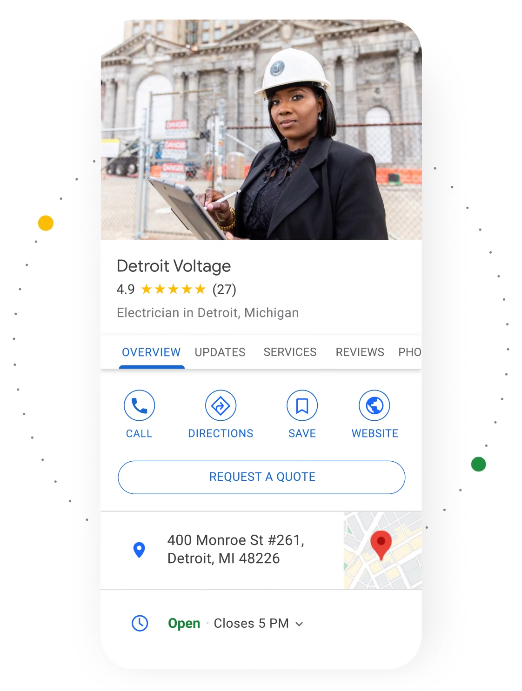
A Google Business Profile helps businesses appear more prominently in local search results, making it easier for potential customers to find them.
Features include:
- Business Information: Basic details such as name, address, and contact information.
- Customer Reviews: Collect and respond to customer feedback.
- Photos and Videos: Showcase your business visually.
- Insights: Analytics to track profile performance.
- Posts: Share updates, offers, and events with customers.
Customers rely heavily on Google when searching for local services, making an optimized profile critical for visibility. This tool helps businesses engage with their community, providing avenues for updates and interactions.
Set Up Your Google Business Profile
Follow the steps outlined here to create your Google Business Profile.
Step 1.
Create a Google Account
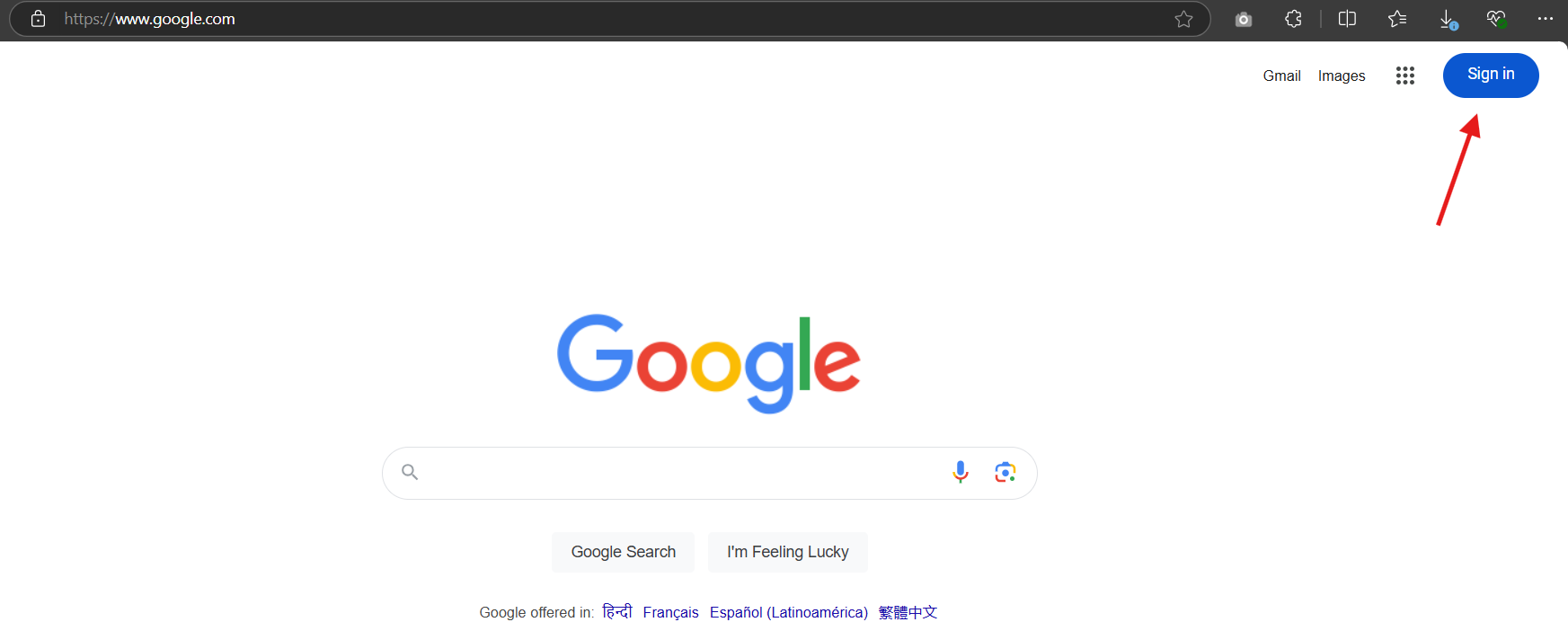
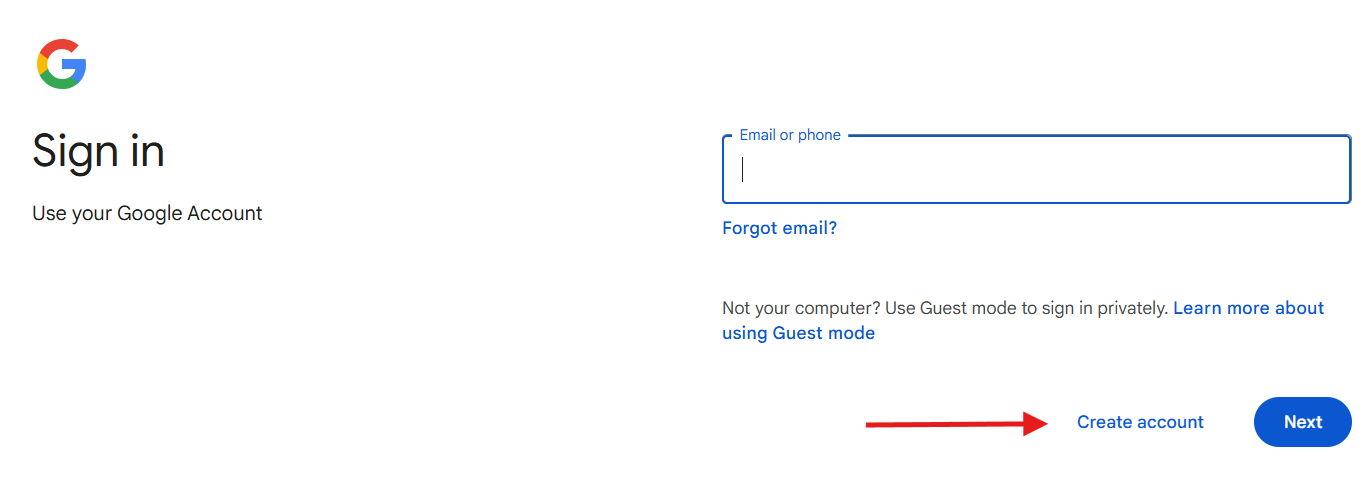
If you don’t already have one, you’ll need to create a Google Account. To do this simply go to google.com, click on "Sign in", then on "Create account".
It’s best to use your business email domain such as hello@yourcompany.com for this. So, if you don't already have a domain name, you'll first need to register one at NameCheap.com.
Step 2.
Go to the Google Business Profile Page
Navigate to the Google Google Business Profile Page - https://www.google.com/intl/en_us/business/
Step 3.
Search for Your Business Name
Enter your business name in the search bar. If your business is already listed, you can claim it. If not, you can add it.
Step 4.
Enter Your Business Information
Choose the appropriate category for your business and provide your business details, including address, contact information, and website
Step 5.
Set Your Service Area (if applicable)
Define the geographic area where you offer services.
Step 6.
Agree to the Terms
Agree to the Terms of Service and Google Privacy Policy
Step 7.
Verify Your Business
Google will ask you to verify your business. This can be done via mail, phone, email, or instant verification (if eligible)
Step 8.
Complete Your Profile
Add photos, business hours, and other relevant information to make your profile more attractive to potential customers.
Step 9.
Mange Reviews and Engage Customers
Let your existing customers know about your profile, and encourage them to leave reviews. Respond promptly to customer feedback.
Step 10.
Optimize and Update
Update your profile regularly with posts, offers, events, photos, customer reviews, any change in hours, etc.
Best Practices for Optimizing Your Google Business Profile?
Here are some effective ways solopreneurs and small business owner can optimize their Google Business Profile:
- Complete All Information - Ensure all fields (name, address, phone number, website, hours of operation) are filled out accurately.
- Add High-Quality Photos - Upload appealing images of your business premises, products, and services to attract more customers.
- Use Keywords - Incorporate relevant keywords in your business description to improve search visibility.
- Collect Reviews - Encourage satisfied customers to leave positive reviews and respond to all reviews promptly and professionally.
- Update Regularly - Keep your profile updated with the latest information about hours, special offers, events, or new products/services.
- Utilize Posts - Use Google Posts to share updates, promotions, events, or news directly on your profile.
- Enable Messaging - Turn on the messaging feature so potential customers can contact you directly through your profile.
- Monitor Insights - Regularly check the insights provided by Google to understand how customers find and interact with your profile.
- Optimize for Local SEO - Ensure consistency in NAP (Name, Address, Phone Number) across all online platforms and use local keywords in your descriptions and posts.
- Add a Business Category - Choose the most accurate category for your business to help Google show your profile in relevant searches.
- Showcase Products/Services - List detailed information about what you offer under the 'Products' or 'Services' section of your profile.
By following these tips, you can enhance their visibility on Google Search and Maps, attracting more local customers effectively.
In the next section, we'll explore the importance of creating valuable content that resonates with your audience and drives engagement on your website. Let's continue our journey towards digital marketing clarity and success!