I recently had some discussions with a few small business owners that asked me about webhosting. Many of them didn't really understand what web hosting is and why it's important to get a good web host, or even what to look for when looking for a web host for their business.
A web host is the foundation of your business online. A slow, insecure or unreliable web host can cost you visitors, customers and search rankings, while a good one keeps your site fast, safe and online without you having to worry. In this web hosting guide, I explain what web hosting is, how it works, what to look for in a web host, the minimum you need based on the type of website you have, and the top 3 web hosting companies I recommend.
What Is Web Hosting?
Web hosting is a service that stores your website's files on a powerful computer, called a server, that is always switched on and connected to the internet. That is what lets anyone, anywhere, visit your site at any time.
To keep things simple, this guide uses the analogy of renting a shop in a building to explain how web hosting works.
Here is how the analogy works:
- Your domain name (like yourbusiness.com) is the street address.
- Your web host is the building and the land it sits on. You pay rent to use the space.
- Your website is everything inside the shop: the shelves, the products, the signs and the lights.
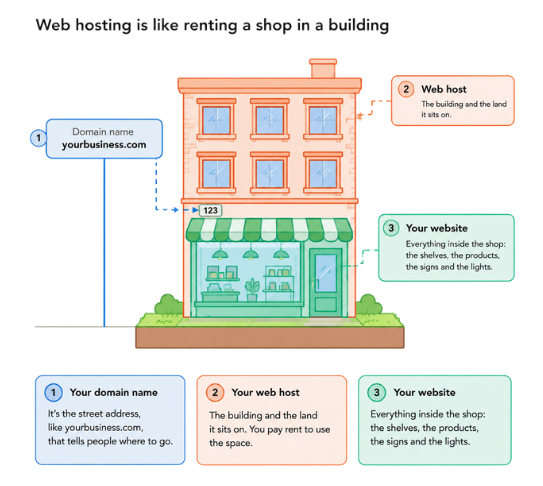
Without a domain, nobody knows where to find you. Without hosting, there is nothing at the address when they arrive. You need both, and they do not have to come from the same company.
And here is the important part that most business owners miss:
A good landlord keeps the building safe, the lights on and the doors working, and fixes problems fast.
A bad landlord rents you a cramped room in a crowded building and does not pick up the phone when the roof leaks. Your host is that landlord, and it affects your site's speed, security and uptime every single day.
How Web Hosting Works
Every time someone visits your website, a quick chain of events happens, usually in well under a second:
- A visitor types your address or clicks a link to your website.
- The internet's "phone book" looks it up. A system called DNS (Domain Name System) matches your domain name to the address of the server where your site lives.
- The visitor's browser knocks on the server's door and asks for the page.
- The server gets your page ready. It gathers your text, images and any data (such as products or blog posts) and puts the page together.
- The server sends the page back, and it appears on the visitor's screen.
The quality of steps 3 to 5 is what you are paying your host for. A fast, well-run server does this in a blink. An overcrowded or poorly maintained one makes visitors wait, and most visitors will not.
Here are a few more words and terms you may meet when shopping around for web hosting:
- Server: the powerful computer that always-on which stores your website.
- Bandwidth: how wide the doorway into your business is. It limits how many visitors can come through at once.
- Storage: the shelf space for your files, images and videos.
- Uptime: the time your shop is open. Ideally, your website should be up 24/7/365 (or 100% of the time). The industry standard for uptime is 99.9%.
- SSL certificate: the padlock that shows up in the browser indicating that your website is secure. It scrambles data so that visitors' details cannot be read by outsiders.
- CDN (content delivery network): small branch warehouses around the world that keep copies of your site, so visitors get it from somewhere nearby.
The Main Types of Hosting
There are various types of web hosting. For most small businesses, the realistic choices are shared hosting, managed WordPress hosting or website-builder hosting. The other types exist, but you will rarely need them.
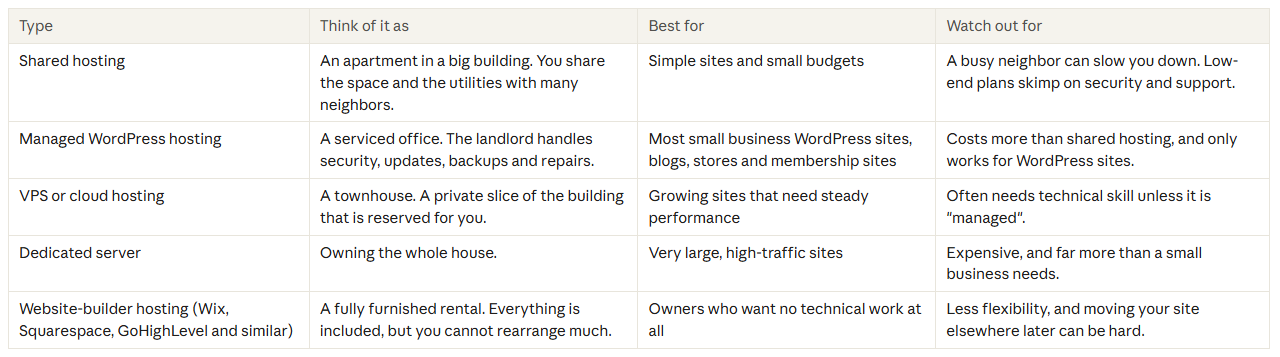

A note on price: the cheapest plans are cheap for a reason. They pack hundreds of sites onto one server and treat support and security as extras you pay for. A little more per month usually buys a much calmer life.
What to Look For in a Web Host
A good web host performs well on four pillars: Security, Speed, Service and Scalability. If a host is weak on any one of them, keep looking.
1. Security: the locks and alarms
Your site will likely be targeted at some point. Automated bots scan the internet around the clock looking for weak sites, so security has to be built into the building, and that shouldn't be sold as an "add-on". Look for web hosts that have these included as standard:
- A free SSL certificate (the padlock and "https")
- Daily automatic backups
- Malware scanning, and ideally free malware cleanup
- Protection against brute-force login attacks
- A firewall
If a host sells basic protection as a paid upsell or add-on, treat that as a warning sign. A landlord who charges extra for door locks is not very motivated to keep the building safe.
2. Speed: how fast the doors open
In our analogy, speed applies to how fast people can get into your store, as well as how quickly they can move around within your store. On your website, this is how quickly your website opens up in the web browser, and how quickly visitors can navigate through your web pages.
Slow sites lose visitors, customers and search rankings. Speed comes mostly from the host's equipment, so look for modern solid-state drives (SSD or NVMe), built-in caching (which keeps ready-made copies of your pages) and a CDN.
3. Service: what happens when things go wrong
If something goes wrong with the physical store your business is in, there are two things you would want to happen - you want to be able to easily and quickly contact the landlord, and you want that he resolves the issue as soon as possible so that the situation doesn't affect your business.
The same is true for your business online... you want to be able to contact your web host immediately, and you want the problem sorted out quickly. I always advise my clients - do not judge support when everything is working. Judge it by what happens when something goes wrong. You want 24/7 live chat, quick replies and a team that takes ownership and fixes the problem, not one that sends you a help article and wishes you luck.
4. Scalability: room to grow
Your business will grow, and your hosting should grow with it. Look for clear upgrade paths within the same company, so a busy month (or a viral post) does not crash your site and you never have to move house just to get more space.
Other things worth checking
- Uptime promise: look for 99.9% or better, and read what the host does if it misses it.
- Backup details: how often, how many days are kept, and whether you can restore with one click.
- Honest pricing: many hosts advertise a low first-term price, then charge much more at renewal. Check the renewal price before you buy.
- Free migration: the best hosts will move your existing site for you at no charge.
- A staging area: a private copy of your site where you can test changes before they go live (especially valuable for stores and membership sites).
- Data center location: servers closer to most of your visitors are faster for them.
- Money-back period: lets you test the service before committing.
Minimum Requirements by Type of Website
The requirements of the hosting you need depends on what your website does. For the purpose of this web hosting guide, I've categorized small business websites into 3 types.
- Type 1: Simple website. A brochure-style site with 1 to 5 pages (home, about, services, contact).
- Type 2: Mid-tier website. More than 5 pages, plus a blog and perhaps booking forms or a portfolio.
- Type 3: Complex website. Many pages, plus a membership area, online courses or an e-commerce store.
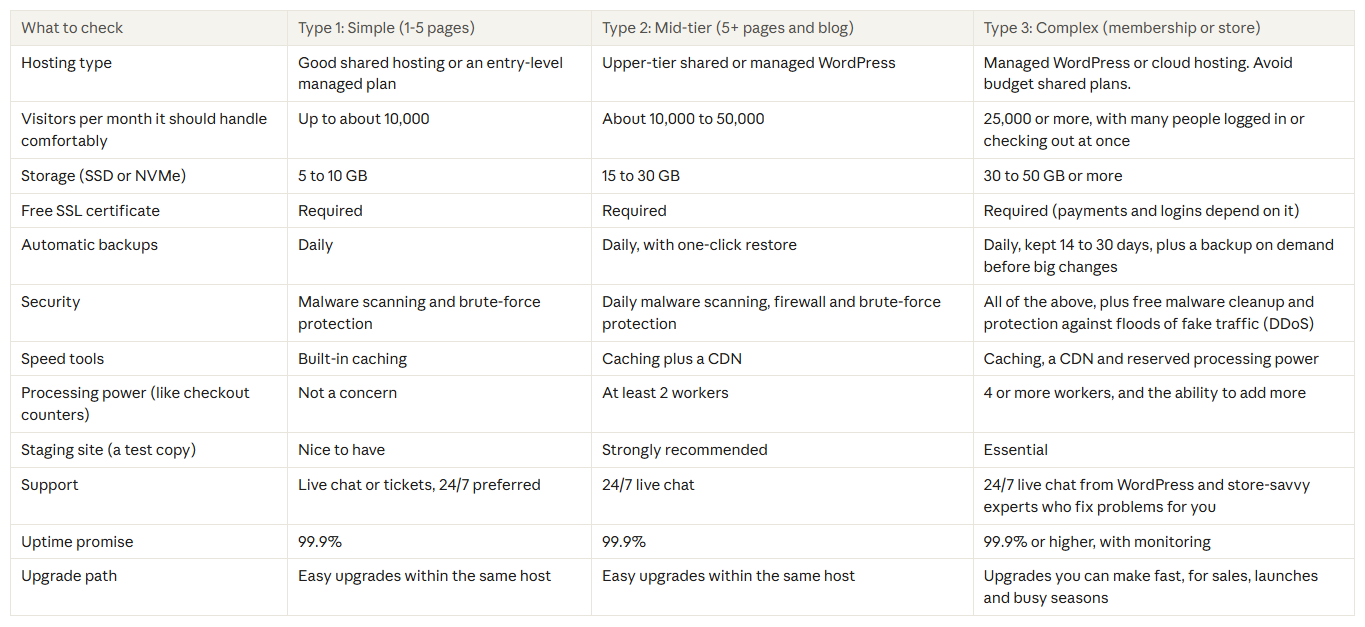
These figures are rules of thumb, not hard limits. Plan details change, so always check the host's current plan page before you buy.
Why membership and store sites need more. On a simple site, the server can hand every visitor the same ready-made copy of a page, like a printed flyer. On a store or membership site, each visitor sees something personal: their cart, their account, their lessons. The server has to build those pages fresh every time, like a cashier ringing up each order by hand. More cashiers (processing power) means shorter queues, which is why Type 3 sites need hosting with real power behind it.
Not sure which type you are? Pick the highest type that applies to anything on your site. A five-page site with an online shop is a Type 3 site.
Keep Big Media Files Off Your Web Host
You want to store large files, especially videos, on a separate service built specifically for that, and show them on your site, instead of uploading them to your web hosting account.
Think of your host as a shop. Storing videos there is like filling the front room with pallets of heavy freight. It can be done, but it crowds out your customers. A video service is the warehouse and delivery truck that brings the freight to people only when they ask for it.
Why it matters
- It slows your site down. A single video is far bigger than a page or an image. Every time someone plays one, your server has to send all of that data, using the same capacity your pages need. Every other visitor feels the slowdown.
- It uses up your plan's limits. Hosting plans cap storage and bandwidth (the width of the doorway). A few videos can fill your storage, and popular ones can use up your bandwidth. That can lead to your web host deliberately slowing down your website down because you’ve used up more than your plan allows, extra fees or a forced plan upgrade.
- It makes backups and moves heavier. Backups include everything on your site, so large files make them bigger, slower and harder to restore. They also make a host-to-host migration take longer.
- Web hosts are not built for streaming. Video services convert your video into several quality levels and send each viewer the one that suits their device and connection. That helps it play smoothly on a phone with a weak signal. A web host usually just sends one big file, which leads to buffering.
- Video services deliver from servers close to the viewer. They use a CDN, so playback starts faster wherever your visitors are.
- It is often cheaper. Paying a video service for what you use usually costs less than upgrading your hosting just to hold video.
Where to put your large files
- Bunny.net: a video hosting and delivery service with a built-in CDN. A strong choice if you want something affordable and purpose-built.
- Amazon Web Services (AWS): very powerful and flexible, but more technical to set up. You will probably want a developer or tech helper for it.
- Simpler options: video platforms like YouTube, Vimeo are less technical to use. Public platforms may show other branding or suggested videos next to yours, so check how much control you need.
For paid courses or members-only videos, choose a service with privacy controls so that only the right people can watch.
How it works on your site
You upload the video to the video service. It gives you a link or an embed code. You paste that into your page. Visitors watch the video on your page as normal, but it is delivered from the video service's servers, so your host never carries the weight.
This matters most for Type 2 and Type 3 sites, especially course and membership sites with lots of lessons. The same advice applies to other big files, like large audio recordings or downloads. Images should stay on your site, but compress them first so they stay small.
Things to Watch For
If you spot any of these while comparing hosts, slow down.
- Security sold as an extra. Paid add-ons for basics like malware scanning or backups suggest the host profits when your site is vulnerable.
- Support that only points to help articles. When your site is hacked or down, you need someone to fix it, not a link to a tutorial.
- A tiny introductory price with a big jump at renewal. Always check what you will pay in year two and beyond.
- "Unlimited" everything. Unlimited plans almost always come with fine-print limits. Ask what happens if your site gets busy.
- Hidden fees for moving in. Good hosts migrate your site for free.
- Recommendations that look too good. Hosting has some of the most generous affiliate programs online, so many "best of" lists are driven by commissions rather than experience. Favor advice from people who have worked with the host and dealt with its support when things went wrong.
- Support that is hard to reach. If you cannot easily find a live chat or phone number before you sign up, it will not get easier afterward.
Popularity is not proof of quality. For my list of web hosts I advise small businesses to avoid, and the reasons why, read Recommended Web Hosting for Small Business.
Web Hosts I Recommend
Three hosts have earned my recommendation through real-world performance on all four pillars: security, speed, service and scalability. My top pick for solopreneurs and small business owners is WPX, because it is the closest thing to truly hassle-free hosting at an affordable price.

Why It Stands Out: Free site migrations, free malware cleanup, and a "Fixed for You" promise: if something breaks, their team fixes it at no extra cost. Support chat replies average around 30 seconds.
Starting Price: From $17.99 per month for one site (as low as $11.99 per month on a 5-year prepaid plan)

Why It Stands Out: Premium managed WordPress hosting on Google Cloud, with every site isolated from the others. 24/7 support from WordPress developers. Options for WooCommerce stores.
Starting Price: From $35 per month for one WordPress install. Your first month is free.

Why It Stands Out: More than 20 years in business, a free CDN, daily backups and 24/7 chat and phone support. A good balance of quality and price. No free malware removal, and support is not as quick as WPX or Kinsta.
Starting Price: StartUp plan from $2.99 per month and GrowBig from $4.99 per month (these are introductory prices for the first year; renewal costs are $17.99/month and $29.99/month)
Prices indicated are as of the time of publishing this post. Web hosts change their plans ever so often, so check each pricing page before you buy.
Which one fits which type of website?
- Type 1 (simple site): WPX's Starter plan or SiteGround's StartUp plan are ideal here. WPX's Starter plan brings free fixes and cleanup if anything goes wrong.
- Type 2 (5+ pages and a blog): WPX or SiteGround's GrowBig plan. If you like the idea of the host handling problems for you, WPX is the stronger choice.
- Type 3 (membership or store): Kinsta or a higher WPX plan. Kinsta is the premium option with enterprise-grade infrastructure.
Want the full story behind each pick, including the hosts I suggest avoiding? Read my Recommended Web Hosting for Small Business article.
Already Have a Host? Switching Is Easier Than You Think
Many business owners stay with a poor host for years because moving feels risky. But, in actuality, it's not risky and it's a simple process - the new host usually does the heavy lifting. It is like a moving company that packs your shop, sets it up in the new building and only hands over the keys once everything is checked.
With the three hosts above, migration is done for you at no charge. The process normally looks like this:
- You ask your new host to migrate your site.
- Their team copies your files and database to the new server.
- They test the new copy to make sure everything works.
- Your domain is pointed to the new server.
- Your site goes live in its new home, often with little or no downtime.
Most small business sites move within a few hours to a day. That's for what's happending in the background, but to your visitors, they may not even know that somethings happening.
Keep your old hosting account active until you have confirmed that the new site works, so you always have something to fall back on.
Signs it's time to move
Your site is slow, it goes down or gets hacked, support is hard to reach or unhelpful, or you keep being pushed to buy upsells for basics like security and backups.
Your Pre-Purchase Checklist
Before you pay any host, tick off these questions. If you cannot get a clear answer from their website or sales chat, that tells you something too.
The Web Hosting Pre-Purchase Checklist
Frequently Asked Questions
What is the difference between a domain name and web hosting?
A domain name is your website's address. Hosting is the space where your website's files are kept. You need both, and you can buy them from different companies.
Do I need separate hosting if I use Wix, Squarespace, Shopify or GoHighLevel?
No. Those platforms include hosting in their monthly price, and so do all-in-one platforms like GoHighLevel. You simply connect your domain name. The tradeoff is portability: your pages live inside the platform, so switching later usually means rebuilding rather than migrating.
How much should good hosting cost?
Expect roughly $3 to $5 per month (introductory price) for a basic shared plan, and about $18 to $35 per month for managed WordPress hosting with stronger support and security. Always check the renewal price, because it is often higher than the first-term price.
Is cheap hosting really a bad idea?
Often, yes. Budget hosting usually means crowded servers, thin security and support that leaves you on your own. One hacked site or a few hours of downtime can cost more than years of savings.
What does "99.9% uptime" mean in real life?
It means your site may be down for about 9 hours in a year. 99.99% allows less than an hour. Either way, a good host monitors this and tells you what happens if it misses the target.
Does my host protect my site completely?
A good host protects the server: firewalls, malware scanning and backups. You still do your part by using strong passwords, and keeping your plugins and themes updated.
Will I lose my business email if I change hosts?
It depends on where your email is set up. If it is part of your hosting plan, ask the new host to include it in the migration. Many owners avoid this problem by using a separate business email service, so email never depends on hosting.
Should I buy my domain from my host?
My recommendation is to keep them separate - buy your domain name from a dedicated domain registrar such as Namecheap, and buy your web hosting from dedicated hosting company (I do not recommend getting your hosting from domain registrars).
What is a CDN, and do I need one?
A CDN (content delivery network) keeps copies of your website on servers around the world so that visitors load it from somewhere close by. It helps speed and security, and good hosts include one.
Can I upgrade my web hosting plan as my business grows?
Yes, and this is a good reason to choose a host with clear upgrade tiers. You can usually move to a bigger plan inside the same company without rebuilding your site.
How do I know if my current host is hurting my business?
Watch for slow load times (free tools like Pingdom or GTmetrix will measure this), unexplained downtime, slow or unhelpful support, past security problems that the host did not help fix, and constant upsells for basics like security and backups.
Why are some hosts recommended everywhere if they are not good?
Because hosting companies pay some of the highest affiliate commissions online. Many "best of" lists are driven by that money, not by hands-on experience. Be wary of recommendations from people who have never had to rescue a hacked site.
Choose Your Host Like a Business Decision
Your web host is the foundation your online presence sits on, so treat it as a business decision, not a shopping-cart afterthought. Work out which type of site you have, use the matching column in the requirements table as your shopping list, and judge every host on security, speed, service and scalability.
If you would like a second pair of eyes on your current setup, help planning a move, or advice on the right plan for your business, my Tech Help service is here for exactly that. You can also get in touch directly.
Affiliate disclosure: Some of the links in this guide, including those for WPX, Kinsta and SiteGround, are affiliate links. If you click through and sign up, I may earn a commission at no additional cost to you. I only recommend hosts that I believe will genuinely help solopreneurs and small business owners.